
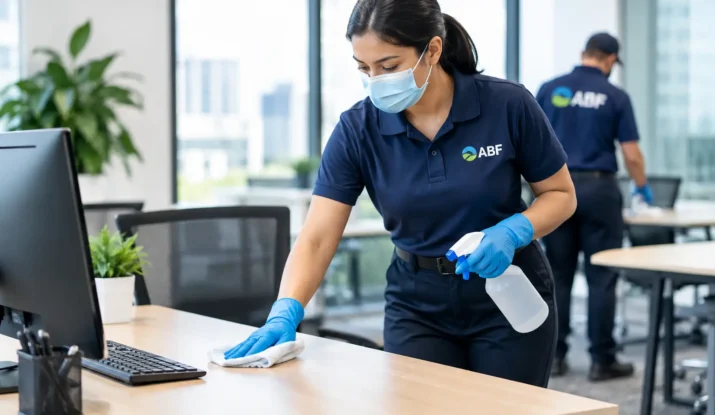
A shared desk can pass through several hands in one shift: an employee arriving early, a relief worker, a manager checking a report, or a contractor using an open station. Knowing how to sanitize shared workstations gives facility and office managers a practical way to reduce avoidable cross-contact while keeping workspaces ready for use.
The goal is not to drench every surface with disinfectant or interrupt operations every hour. It is to build a consistent process that removes soil, addresses high-touch points, uses products correctly, and gives employees confidence that the station is clean when they sit down. For busy offices, schools, healthcare-adjacent facilities, call centers, manufacturing offices, and reception areas, consistency matters more than a rushed wipe-down.
Start With the Difference Between Cleaning and Sanitizing
Cleaning removes visible dust, crumbs, smudges, and organic material from a surface. Sanitizing reduces certain germs on a surface to levels considered safer under public-health standards. Disinfecting is a stronger process intended to kill or inactivate a broader range of germs, depending on the product label.
These terms are often used interchangeably, but the distinction affects results. A disinfectant applied to a keyboard coated with dust and food residue may not work as intended. Soil can create a barrier between the product and the surface. Clean first when needed, then apply the sanitizer or disinfectant according to its label directions.
For most general shared workstations, a routine of cleaning and sanitizing high-touch surfaces is appropriate. During a known illness concern, a higher-risk environment, or a facility-specific protocol, disinfection may be necessary. The correct choice depends on the setting, the surfaces involved, and the product’s approved use.
Identify What People Actually Touch
A workstation is more than the desktop. The surfaces most likely to be missed are often the ones employees touch repeatedly without thinking about them. A complete service routine should account for the keyboard, mouse, monitor controls, desk phone, headset, chair arms and adjustment levers, drawer pulls, light switches, power buttons, docking stations, shared pens, and nearby cabinet handles.
In hoteling or hot-desking environments, include the items that travel between users. Shared tablets, scanners, clipboards, time clocks, handheld radios, and credit-card terminals can become high-contact points quickly. In industrial offices, consider shared control panels and tool cabinets. In reception areas, check sign-in screens, counters, and visitor pens.
This is where a written workstation map helps. It gives daytime staff, janitorial crews, and relief personnel the same definition of a completed station. Without one, cleaning quality can vary from shift to shift, even when everyone is working hard.
How to Sanitize Shared Workstations Step by Step
Start by clearing the area of personal items, loose paper, food containers, and clutter that prevents access to the work surface. If a desk is assigned to different employees throughout the day, each user should remove personal belongings before leaving. This protects privacy and makes sanitation faster.
Next, remove visible soil using a clean microfiber cloth and an appropriate cleaner. Microfiber is useful because it captures dust and residue effectively without pushing contaminants from one area to another. Use fresh cloths as needed, especially when moving from break rooms, restrooms, or public areas to desks.
Apply the approved sanitizer or disinfectant to the surface or to a cloth, depending on the product directions and the equipment being cleaned. Electronics require extra care. Never spray liquid directly into a keyboard, monitor, phone receiver, or laptop port unless the manufacturer specifically allows it. A lightly dampened microfiber cloth is usually the safer approach.
Keep the surface visibly wet for the full contact time listed on the product label. This is one of the most common missed steps. If the label requires a surface to remain wet for several minutes, wiping it dry after a few seconds may reduce the product’s effectiveness. Plan the process so the product can sit without delaying the next user.
Allow surfaces to air dry unless the label directs otherwise. Once dry, restock any shared supplies that belong at the station, such as pens, note pads, wipes, or disposable headset covers. A clean desk that is missing essentials can still create frustration and encourage employees to search through nearby stations.
Use the Right Products for the Surface
The strongest chemical is not automatically the best choice. Harsh products can damage monitor coatings, discolor laminate, degrade chair materials, or leave sticky residue on touchscreens. Product selection should match the surface and follow both the chemical label and the equipment manufacturer’s care instructions.
Facilities should maintain a simple, approved-product list for workstation cleaning. Include the product name, intended use, contact time, dilution requirements if applicable, safety information, and surfaces where it should not be used. This eliminates guesswork for employees and cleaning teams.
Color-coded cleaning systems add another layer of control. Dedicated cloth colors for restrooms, break rooms, general office surfaces, and glass help reduce the risk of using a restroom cloth on a desk or conference table. The process is simple, but it supports stronger sanitation standards when crews service multiple areas of a building.
Set a Frequency That Matches How the Space Is Used
A workstation used by one employee all day does not need the same schedule as a shared call-center desk used across three shifts. Frequency should be based on turnover, traffic, operational risk, and the presence of shared equipment.
For a typical office, common-touch workstation surfaces should receive routine attention during scheduled janitorial service, with employees encouraged to wipe down personal contact points before and after using a shared desk. High-turnover workstations should be sanitized between users whenever practical. In environments with public interaction, food handling, healthcare services, or frequent shift changes, more frequent service is often justified.
The best schedule is one that people can actually follow. An overly ambitious plan with no ownership, supplies, or verification will fail quickly. A clear process with realistic timing is more dependable than an impressive policy that exists only on paper.
Make Sanitation Easy for Employees to Follow
Professional cleaning crews can provide thorough recurring service, but shared workstations also need support between scheduled visits. Place approved wipes or spray-and-cloth stations where employees can access them without walking across the building. Keep products clearly labeled and avoid mixing chemicals or refilling containers without proper identification.
A short instruction card at shared desks can be more effective than a long email. It should tell users what to wipe, when to do it, and how long the surface must remain wet if applicable. It should also remind users not to spray electronics directly.
Training matters as much as supplies. Employees are more likely to participate when the instructions are straightforward and the expectation applies consistently to everyone, including managers, temporary staff, and visitors using a workstation. The message should focus on shared responsibility, not blame.
Build Quality Checks Into the Routine
Sanitation is difficult to manage if no one verifies whether it happened. Supervisors can spot-check shared stations at different times of day, looking for residue, dust buildup, missed touchpoints, empty wipe dispensers, and improperly stored products. A simple service log can document when high-turnover areas were completed and identify recurring supply gaps.
Pay attention to employee feedback as well. Complaints about sticky keyboards, smudged monitors, empty disinfectant stations, or odors often point to a process issue rather than an isolated incident. Addressing the cause quickly protects confidence in the entire cleaning program.
For larger offices and multi-tenant properties, a professional janitorial partner can standardize procedures across floors, shifts, and locations. ABF Facility Services uses trained, uniformed, insured teams, microfiber tools, color-coded systems, and facility-specific cleaning plans to help Chicagoland businesses maintain consistent, presentable shared spaces.
Avoid Shortcuts That Create Bigger Problems
Do not use one cloth across multiple workstations until it is visibly soiled. Do not combine chemicals in a bottle or bucket. Do not assume a pleasant scent means a surface has been sanitized. And do not overlook contact time just because the desk looks clean.
It is also wise to avoid storing food, used drinkware, or personal hygiene items at shared desks. These items create clutter and make a consistent reset more difficult. A workstation should be easy to inspect, easy to wipe, and ready for the next person without an employee having to clean around someone else’s belongings.
A dependable workstation sanitation routine is a small operational detail with a visible payoff. When every shared desk is clean, stocked, and ready for the next user, employees can focus on their work and visitors see a facility that takes care of the details.